
Breakthrough LektorAI Feature in ALLPlayer
(now also as an audio track and with your own voice)
ALLPlayer is the first in the world to introduce an innovative AI Voice-Over feature, changing the way viewers experience movies, thanks to the use of advanced artificial intelligence technology for voice generation.
🎙️ From ALLPlayer version 9.6, the feature has been further expanded with:
- creating ready-to-use video files with voice-over,
- support for your own voice,
- local subtitle creation,
- preparing videos in multiple language versions.
Thanks to this, you can prepare professional video materials ready for publication on any platform – without a recording studio and without additional software.
Who is AI Voice-Over for?
- for Creators who can now:
- record content in your language,
- automatically create natural-sounding narration in any supported language,
- use it as a voice for a movie, course, presentation, advertising campaign, or any project,
- instantly share their content with a global audience. - For people who dislike dubbing in movies, which destroys the original voice and authenticity of actors.
- For visually impaired users who have difficulty reading subtitles.
- For those who like to play movies in the background while doing other activities and don’t want to focus on reading subtitles.
This feature was originally introduced in ALLPlayer in 2024 thanks to ElevenLabs.io – a world leader in this field. Currently, ALLPlayer uses various TTS systems based on the MIT license, such as Chatterbox. Access to the feature is based on so-called micro-payments. Please remember that AI Voice-Over can only be created for files to which you have full rights (see Terms & Conditions).
📌 Requirements
To use AI Voice-Over, you need:
- ALLPlayer version 9.6 or newer,
- a video file (MP4, MKV, and others),
- a subtitle file in SRT format,
- an Internet connection (for voice generation),
- an active AI Voice-Over package (email + access code).
📂 Supported Formats
Input Video Files
- MP4
- MKV
- and others
Subtitles
-
SRT (the only supported format for AI Voice-Over)
User Voice Sample
- WAV
- max. 10 seconds
- recommended: 44.1 kHz / 48 kHz, without effects
(you can record e.g. at https://audiomass.co/)
🌍 Supported Languages
ALLPlayer supports voice generation in, among others:
Polish, English, German, French, Spanish, Italian, Ukrainian, Russian, Czech, Slovak, Hungarian, Dutch, Swedish, Norwegian, Finnish, Portuguese, Japanese, Chinese, Korean, Turkish.
The list of languages is constantly expanded in future updates.
▶️ Creating Voice-Over from Subtitles
After starting a movie, the message “Voice-Over Available – Download” will appear on the screen. Clicking it allows you to download the AI voice track.
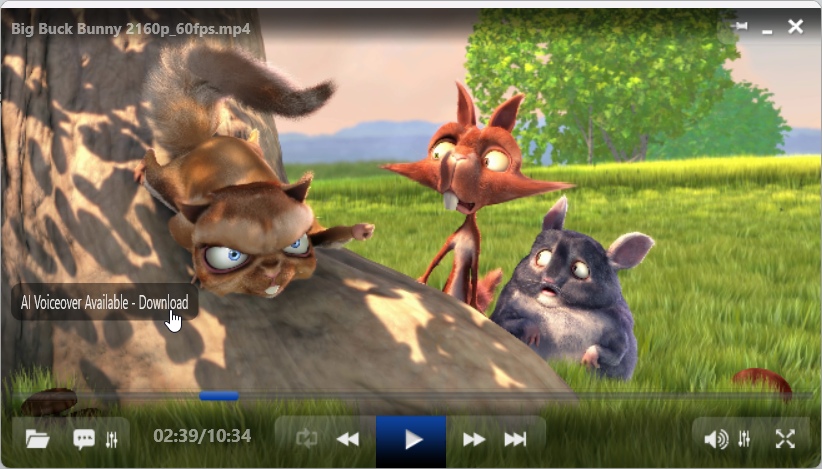
If AI Voice-Over was already downloaded for this movie, it will start automatically. If this is the first download, the settings window will appear with the AI Voice-Over tab active:
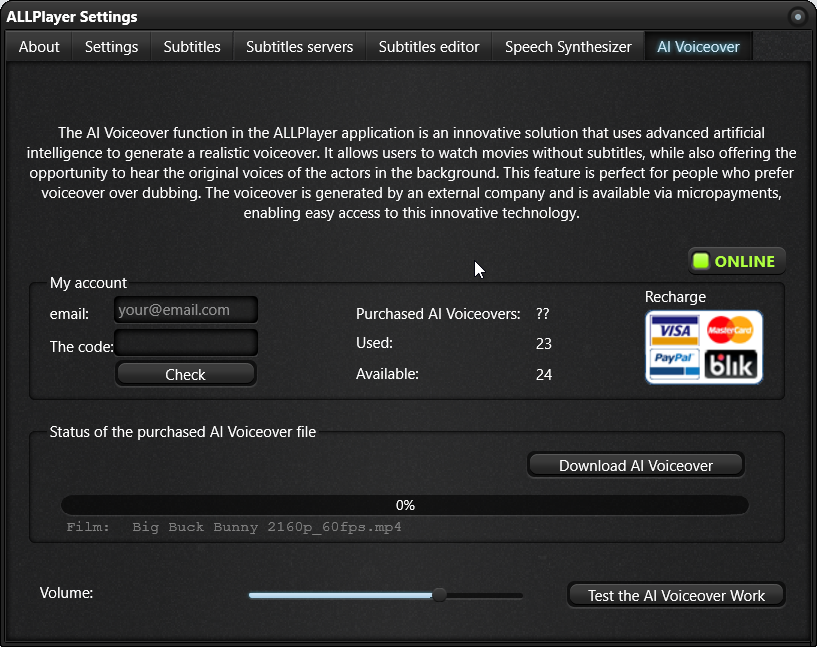
Here you can check your account status, voice generation options, test the feature, or download the AI voice track.
▶️ Step-by-Step Voice-Over Creation
Step 1 – Prepare Subtitles
In version 9.6:
- subtitles do not have to be downloaded from the Internet,
- you can create them locally,
- you can prepare your own language versions.
ALLPlayer supports only SRT files.
Step 2 – Start AI Voice-Over
- Open the movie.
- Load SRT subtitles.
- Go to:
Settings → AI Voice-Over - Select language and settings.
Step 3 – Generate Voice
The program:
- analyzes timestamps,
- synchronizes speech with video,
- generates the voice track.
When the movie and subtitles are loaded, just click “Download AI Voice-Over”.
Generation time depends on the length of the movie.
🔊 Voice Volume Adjustment
During playback, you can adjust the voice volume relative to the original sound.
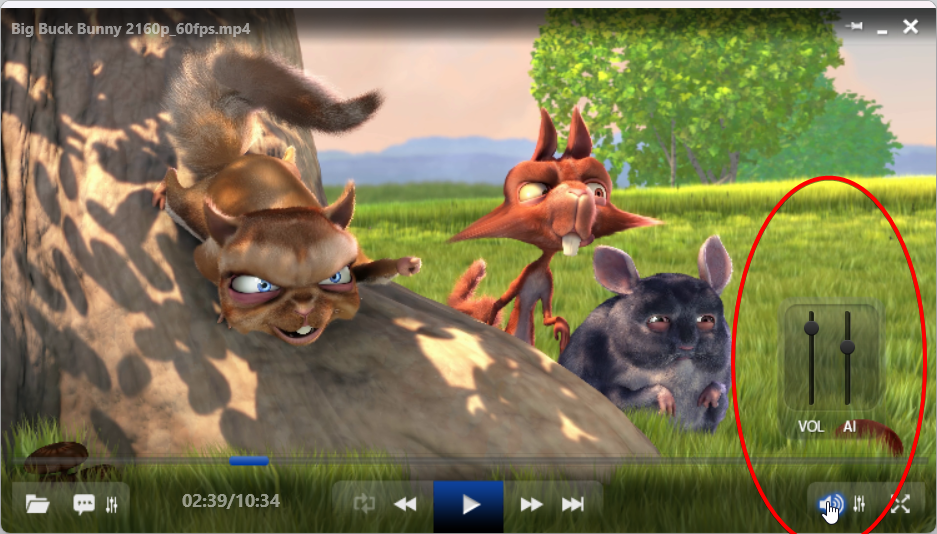
⚠️ Important:
After saving the voice as a track in the video file:
➡️ the volume is permanently saved
➡️ it cannot be changed later using the slider
Therefore, it is recommended to set the proper level before exporting.
🎬 Creating a Video File with Built-in Voice Track
Option:
✅ Create video file with additional AI Voice-Over audio track
After enabling this option, ALLPlayer:
- creates a new video file,
- keeps the original audio,
- adds the voice track,
- saves the finished file.
Output Format
📁 The output file is always in:
MKV
This ensures full compatibility with multiple audio tracks.
Final Result
The file contains:
| Track | Content |
|---|---|
| Audio 1 | AI Voice-Over |
| Audio 2 | Original sound |
You can switch tracks on:
- Smart TV
- Android TV
- computers
- phones
- consoles
No need to use ALLPlayer.
🎤 Using Your Own Voice
Option:
✅ Use your own voice (WAV, up to 10 seconds)
Allows you to create an AI voice that sounds like you — and even create voice-overs in languages you don’t speak.
Try how you sound in Italian, for example :)
How to Prepare Recording
- record 2-3 sentences (.wav file, mono, up to 10 seconds) - You can do this at https://audiomass.co/ - open the website and you'll be able to record from your camera's microphone or headphones,
- in a natural voice,
- try not to read, but to speak normally (reading isn't your real speech, so the AI won't capture your style well),
- loudly, but without distortion (if you record too quietly, the narrator will always be too quiet),
- don't pause or cut them out, for example, in this program https://audiomass.co/ - the pause between words is still speech to the AI, and nothing good will come of it.
- no noise,
- no effects,
Process
- Load the movie.
- Load your WAV voice file.
- Load subtitles.
- The program analyzes voice tone.
- Generates full voice-over.
Result
🎧 Entire movie in your voice
🎯 Consistent content
📢 Brand or creator recognition
🌐 Multiple Languages – Perfect for Creators
ALLPlayer allows:
- creating subtitles in multiple languages (also with your own voice),
- generating multiple voice versions,
- creating one movie in many languages.
Thanks to this, you can:
🎬 prepare one material
🌍 publish globally
📈 increase reach without extra costs
Ideal for YouTubers, course creators, and companies.
💳 AI Voice-Over Package System
No traditional user account is required.
The system is based on packages.
In the program you enter:
- email address,
- access code.
ALLPlayer shows:
📊 how many voices you bought
📊 how many you used
📊 how many remain
You have full control over usage.
⚙️ Parameters and Limitations
| Parameter | Value |
|---|---|
| Subtitle format | SRT |
| Max voice sample | 10 s |
| Offline mode | No |
| Internet | Required |
| Export format | MKV |
| Version | ≥ 9.6 |
| Chars | 200.000 |
🔄 Differences from Older Versions
| Feature | Before | 9.6 |
|---|---|---|
| Built-in voice | ❌ | ✅ |
| Video export | ❌ | ✅ |
| Own voice | ❌ | ✅ |
| Local subtitles | ❌ | ✅ |
| Multiple languages | ⚠️ | ✅ |
| Smart TV support | ❌ | ✅ |
🚀 Use Cases
AI Voice-Over in ALLPlayer is perfect for:
🎥 YouTube videos
📚 online courses
📢 marketing
🏢 presentations
🌍 language versions
📦 archiving
No recording studio. No full-time narrator. No complex editing.
❓ Mini FAQ
- Make sure you have the latest ALLPlayer 9.6.
- If the movie contains multiple embedded Polish subtitle tracks, select the correct one before creating AI Voice-Over (some tracks may cover only parts of the movie).
- If there are no embedded subtitles, you can attach your own.
If ALLPlayer says AI Voice-Over is downloaded but you can’t hear it, check if the volume is not muted (see the image showing the slider).
Have another problem? Contact us at: